U can find useful informations from this blog..Please Click on the Read more to view full post. Blog Owner - Pardeep.
Monday, September 9, 2013
Tuesday, August 27, 2013
Configure TP Link Modem 8951 wifi with BSNL Broadband
First of all connect your wiring propely to the modem.
connect pc or laptop with LAN cable and then open any of your web browser . Then type 192.168.1.1 in your web browser. You will ask to log in .
USERNAME- admin
PASSWORD - admin
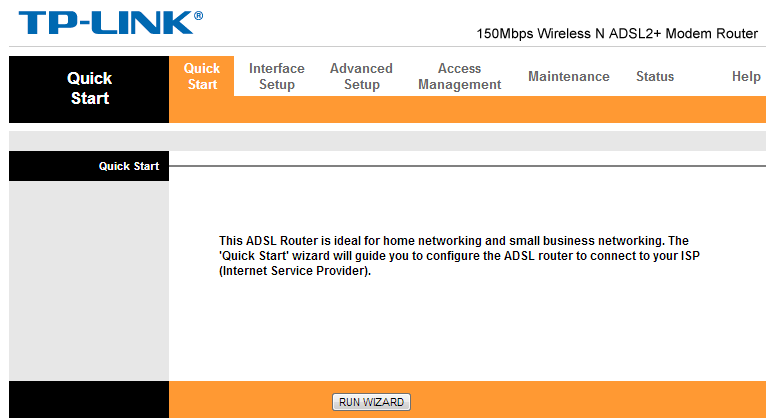
Now Click on Quick Start and click on Run Wizard.
Then click Next.
Set your Time.
Then Click next .
Now choose your internet connection type as PPPoE/PPPoA.
Now click next again. and put your Username ( given by bsnl broadband services) it will be like this - if your name is ashok and tel phone number is 01111-?????? then your username will be as1111??????_ncdr
and password will be (password).
now Put 0 in VPI.
and 35 in VCI.
Connection type PPPoE LLC.
connect pc or laptop with LAN cable and then open any of your web browser . Then type 192.168.1.1 in your web browser. You will ask to log in .
USERNAME- admin
PASSWORD - admin
Now Click on Quick Start and click on Run Wizard.
Then click Next.
Set your Time.
Then Click next .
Now choose your internet connection type as PPPoE/PPPoA.
Now click next again. and put your Username ( given by bsnl broadband services) it will be like this - if your name is ashok and tel phone number is 01111-?????? then your username will be as1111??????_ncdr
and password will be (password).
now Put 0 in VPI.
and 35 in VCI.
Connection type PPPoE LLC.
Now click Next and put any name in SSID . and if u want to secure your wireless network then put any key. and click next to save your settings. Now settings will be saved . Now go to Interface setup then click LAN now go to last setting DNS Relay.
then choose user discovered DNS servers.
Now put Primary DNS- 8.8.8.8
Secondary DNS - 8.8.4.4
reboot your modem now .
Now You can see internet light being green on modem and enjoy your internet services
Sunday, July 8, 2012
Set Up NetGear N150 DGN1000 ADSL + Wi Fi modem with BSNL broadband
First of all connect your telephone lines and LAN wiring properly.
Then open http://192.168.0.1 in any of your web browsers.
you will see some log in info.
enter username - admin
password - password
Now u can set up configuration.
in the left corner now click Basic Setting.
you will see
Then open http://192.168.0.1 in any of your web browsers.
you will see some log in info.
enter username - admin
password - password
Now u can set up configuration.
in the left corner now click Basic Setting.
| does your internet connection need a log in click yes and choose PPPoE ( PPP over ETHERNET) now put your username and password which you have received from BSNL . now IP address GET dynamically from ISP. Now DNS adress click on use this DNS servers primary DNS- 218.248.255.145 Secondary - 218.248.255.146 now NAT (Network Address Translation) click ENABLE NOW APPLY these settings by clicking APPLY .. let the page refresh. now click on ADSL SETTING in left corner. multiplexing method - LLC BASED VPI- 0 VCI -35 DSL MODE- AUTO ( MULTI -MODE) THEN APPLY THESE SETTINGS AND LET the PAGE REFRESH. and now if u wana set a security key for ur Wi fi broadband connection then u can get these settings in Wireless Settings. now switch off and reboot ur modem once. BSNL broadband will automatically get connected whenver you will switch your modem on. If u have any questions or suggestions please comment.. THANKS |
Wednesday, March 7, 2012
Balance Check numbers of indian telecom operators
Airtel
Balance- *123#
internet data balance check -- *123*10#
Idea
Balance - *130#
Best Mobile Phone Web Browsers
I m posting some of the best and useful mobile browsers here.
1. Opera Mini - one of the best browser to open any website on your phone. It compresses website and lower your data traffic. U can download it from here.
Download
2. UCweb Browser - it is also a good browser specially for downloading big files faster.
Download ( Direct download )
3. iBrowser - New browser from ibibo group.
Download
4. Google Chrome Android
Download Chrome
5. Firefox Android
Download
1. Opera Mini - one of the best browser to open any website on your phone. It compresses website and lower your data traffic. U can download it from here.
Download
2. UCweb Browser - it is also a good browser specially for downloading big files faster.
Download ( Direct download )
3. iBrowser - New browser from ibibo group.
Download
4. Google Chrome Android
Download Chrome
5. Firefox Android
Download
Tuesday, March 6, 2012
Useful Educational Websites
Just click on the links and u will be redirected to the websites-
Haryana Primary Education(www.harprathmik.gov.in)
School Education Haryana
C.T.E.T. 2012 ( C.T.E.T results and informations)
Haryana Staff selection Commission
Haryana Public Service Commission
Haryana Primary Education(www.harprathmik.gov.in)
School Education Haryana
C.T.E.T. 2012 ( C.T.E.T results and informations)
Haryana Staff selection Commission
Haryana Public Service Commission
Monday, March 5, 2012
Free Mobile Applications ( Android, Blackberry, Symbian )
Click on the bold names to go to the website to download free applications.
Android Apps
Symbian
Blackberry
Android Apps
Symbian
Blackberry
Online Shopping Websites
I am posting some of the useful websites lists for purchasing products online . You can always very nice deals and cheap prices than market price. I have purchased from some websites. Here is the list of spme of useful websites. Just click on the site name to go to the website to purchase useful products on a reasonable price.
Flipkart
Tradus
Homeshop
Ebay
Letsbuy
Snapdeal
Indiatimes
Rediff
Naaptol
Futurebazaar
Myntra
Bagittoday
Out of all these i have found Flipkart, Tradus and Ebay are better because of cheaper price and best delivery.. Please comment your reviews and experiences if u have ever shopped from these websites. Thanks
Flipkart
Tradus
Homeshop
Ebay
Letsbuy
Snapdeal
Indiatimes
Rediff
Naaptol
Futurebazaar
Myntra
Bagittoday
Out of all these i have found Flipkart, Tradus and Ebay are better because of cheaper price and best delivery.. Please comment your reviews and experiences if u have ever shopped from these websites. Thanks
Monday, September 20, 2010
Easy Maths Calculations and Convreters Website
Sunday, September 12, 2010
Countries and their Capitals
Country
|
Capital
| |
Tiranë
| ||
Subscribe to:
Posts (Atom)